
Introduction: A Surprise Game in Your Search Box
Imagine typing a few words into Google and suddenly finding a fun, interactive game right there in your search results. That’s exactly what happened when Google introduced Google Block Breaker, a hidden browser‑based arcade game that instantly captured the attention of casual players and retro gaming fans alike. This game revives the classic brick‑breaking experience many grew up with, blending nostalgia with modern gameplay that anyone can enjoy right from their browser without downloads or installs.
Google Block Breaker isn’t just another internet trend—it’s become a favorite quick diversion and a perfect example of how a simple idea can deliver hours of fun. Throughout this article, you’ll learn what Google Block Breaker is, how it works, why it has become so popular, and how you can play it on any device.
What Is Google Block Breaker?
Google Block Breaker is a browser‑based arcade‑style game that appears right in Google Search when you search for terms like “block breaker.” Unlike most games that require downloading an app or signing up for an account, this game runs instantly within your web browser, whether you’re on a laptop, tablet, or smartphone.
A Modern Twist on a Classic
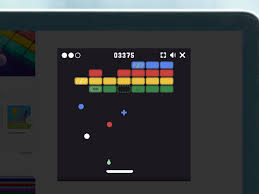
The core gameplay of Google Block Breaker is inspired by classic titles like Atari Breakout and Arkanoid. You control a paddle at the bottom of the screen and bounce a ball toward rows of colorful blocks above. As the ball hits each block, it disappears, earning you points and clearing the way to progress through levels.
This mix of simple controls, smooth graphics, and increasing difficulty keeps players engaged. What’s better is that you can start playing instantly with no setup at all—just search and click play.
How to Play Google Block Breaker
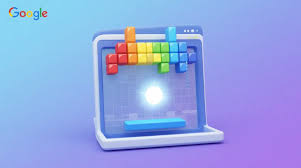
Playing this game is incredibly easy, even for beginners. Here’s how it typically works:
Start the Game
To fire up Google Block Breaker:
- Open your web browser.
- Go to Google Search.
- Type in “Google Block Breaker” or just “block breaker.”
- Click the game card that appears at the top of the search results.
Once you click play, the interactive game launches instantly in your browser.
Understanding the Controls
Movement and control are simple:
- Use left and right arrow keys on a keyboard.
- Or drag/move the paddle with a mouse or touchscreen on mobile devices.
- Paddle placement changes how the ball bounces, allowing strategic shots to hit specific blocks.
You usually start with three lives, and if the ball slips past your paddle, you lose a life. The goal is to clear all the blocks before you run out of lives.
Gameplay Features That Make It Fun
What makes Google Block Breaker stand out from similar games isn’t complexity, but how accessible, satisfying, and replayable it feels.
Immediate Access
No downloads. No accounts. No long waiting times. Just search and play.
This instant playability has made it especially popular for short breaks, quick entertainment, and moments of nostalgia.
Progressive Difficulty
As you progress, levels get harder. Blocks may be arranged in trickier patterns, or the ball may speed up. This scaling challenge keeps the experience fresh and fun.
Power‑Ups and Bonuses
Depending on the version or platform, you may encounter power‑ups that:
- Add extra balls
- Expand your paddle
- Give special attacks or effects
These elements make the game more dynamic and strategic.
Why People Love Google Block Breaker
This game’s appeal extends beyond simple play mechanics. A few reasons it stands out include:
1. Nostalgia for Classic Arcade Games
Many players remember similar brick‑breaking games from decades past. Google Block Breaker taps into that retro charm while adding modern polish.
2. Easy to Learn, Hard to Master
The rules are simple: just keep the ball bouncing and break all the blocks. But mastering angles, speed, and strategy takes time and practice.
3. Accessible to Everyone
Whether you’re a casual gamer or a dedicated fan, this game suits all skill levels. Kids can enjoy it, adults can relax with it, and anyone can revisit old memories with it.
4. Works Across Devices
You don’t need special hardware—just an internet connection and any modern browser. It’s playable on desktops, phones, and tablets without extra steps.
Tips to Play Better and Score Higher
Want to improve your skills and top your personal best? Here are some proven strategies:
Master Your Paddle Movement
The angle at which the ball hits the paddle changes its direction. Practice using the edges and center of the paddle to aim your shots.
Watch Out for Power‑Ups
When power‑ups drop, make sure to catch them. These can give you extra balls, bigger paddle size, or other boosts that make advancing easier.
Study Block Patterns
Take a moment before each round to learn the layout. Identifying clusters of blocks and planning the best path to hit them can help you clear levels faster.
Is Google Block Breaker Good for Learning?
Although it’s just a game, Google Block Breaker also offers subtle benefits:
- Enhances hand‑eye coordination
- Sharpens reaction time
- Encourages planning and quick decision‑making
These benefits make the game more than just fun—it can actually help your brain stay active.
Conclusion: More Than Just a Fun Time‑Killer
Google Block Breaker proves that simple ideas can offer hours of entertainment and even mental engagement. As a browser‑based hidden gem tucked inside Google Search, it bridges generations of gaming history, from classic arcade cabinets to modern internet culture. Whether you’re looking for a quick distraction, a way to challenge yourself, or a dose of retro nostalgia, this game delivers. Give it a try—you might find yourself completely hooked within minutes.
Frequently Asked Questions
1. Is Google Block Breaker free to play?
Yes. It’s completely free and runs in your browser without any downloads.
2. Can I play Google Block Breaker on my phone?
Absolutely. It works on mobile browsers and through the Google app.
3. Do I need a special account to play?
No. You just search for the game and start playing instantly.
4. Is it the same as the old Google Atari Breakout Easter egg?
It’s inspired by it but features more levels and updated gameplay.
5. Can I save my progress?
Progress saving varies by version, but in most cases you start fresh each time you play.
